The Data Item Importance report shows which items in your Knowledge Graph are the most influential and central based on how they are connected to everything else. This report helps you understand:
What entities and pages matter most in your Knowledge Graph
Where authority, relevance, and connectivity are concentrated
Which items should be prioritized for optimization, accuracy, and governance
Part of Knowledge Graph Health Reports
Step 1: Orphan Node Analysis – Find disconnected items
Step 2: Data Item Importance – Identify what matters most
Step 3: Data Item Similarity – Improve data quality and clarity
What This Report Shows
Each item in this report is ranked using PageRank, a graph-based algorithm that measures importance based on connections, not just existence. In simple terms:
An item is important if many important items connect to it.
This mirrors how influence works in real-world networks and search engines.
How to Interpret the Results
The Data Item Importance report ranks items based on their structural importance in the Knowledge Graph, using a graph-based scoring method (PageRank). This report does not evaluate content quality or performance. It evaluates connectivity and influence.
What the score means (plain language)
A higher score means:
The item is connected to many other items that are themselves important
The item sits closer to the “center” of your Knowledge Graph
A lower score means:
The item is more peripheral
It may be under-linked, niche, or isolated to a small section of the graph
Is there a “good” or “bad” score?
No. There is no universal good or bad number. Scores are:
Relative to your Knowledge Graph
Meaningful only when compared to other items in the same report
What matters is ranking and alignment, not hitting a target value.
The key question to ask
“Do the highest-ranked items reflect what this site is actually about?”
If the answer is yes:
Your Knowledge Graph structure broadly matches your business priorities
If the answer is no:
Important concepts may be under-connected
Less important pages or entities may be over-linked
Structural adjustments are likely needed
What actions influence importance scores?
You do not optimize importance directly. You change structure. Typical actions include:
Adding meaningful relationships to under-ranked but important items
Ensuring core entities are referenced consistently across relevant content
Reducing excessive links to low-value or utility pages
Fixing orphan or near-orphan items first
Think of this report as a structural alignment check, not a performance metric.
How to Read the Report
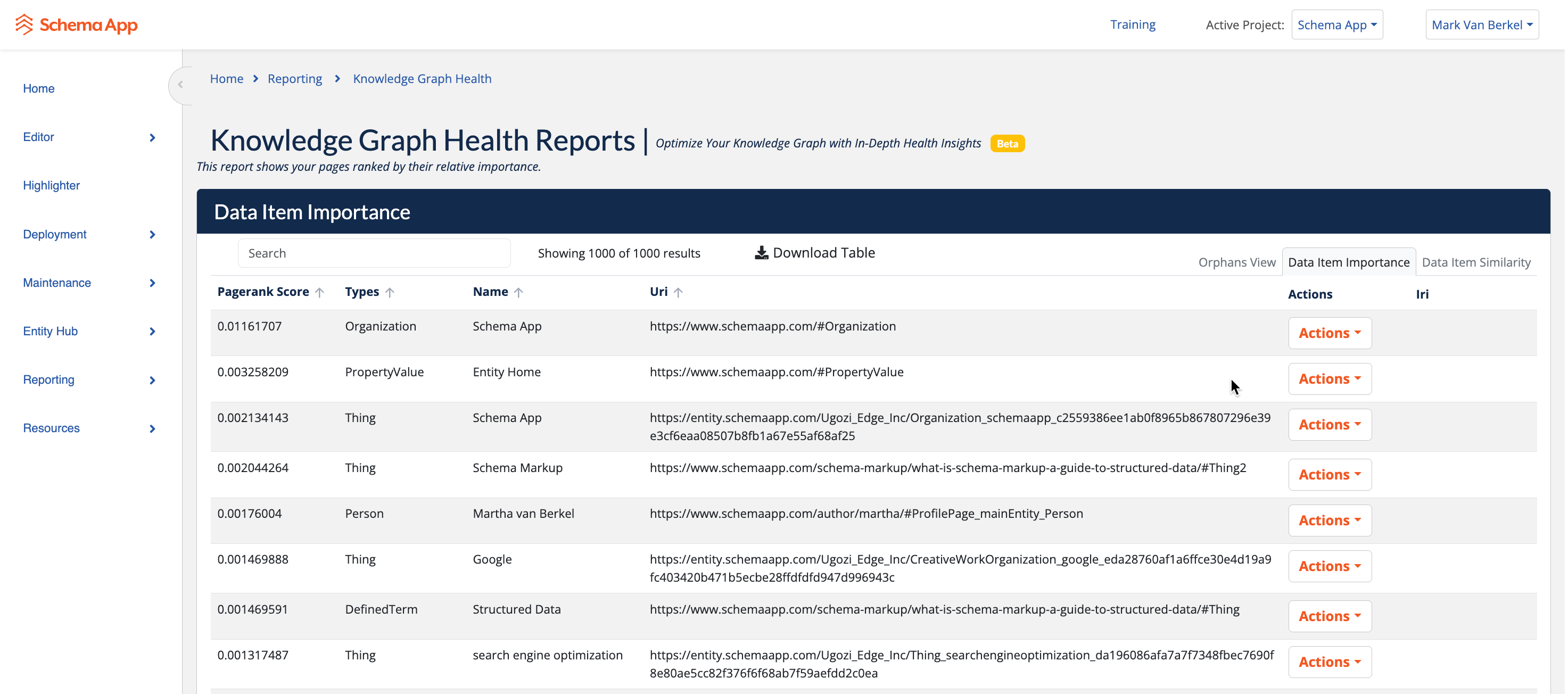
Each row represents a single data item in your Knowledge Graph.
Columns Explained
PageRank Score
A numerical score representing the item’s relative importance in the graph.
Higher score = more central, more connected, more influential
Scores are relative within your project
Small decimal differences still matter
Use this column to quickly identify your top-tier entities and pages.
Type
The schema.org (or custom) type of the item.
Examples:
OrganizationPersonThingDefinedTermPropertyValue
This helps you understand what kind of items carry influence in your graph.
Name
The human-readable name of the item.
This is typically the entity name, page title, or defined term.
URI
The canonical identifier for the item.
Confirms exactly which page or entity is being ranked
Useful for validation, debugging, and cross-referencing
Actions
Contextual actions you can take on the item, such as:
Viewing or editing the entity
Navigating to its source
Managing its relationships
(Available actions depend on the item type.)
What PageRank Means (and What It Doesn’t)
What It Means
Measures graph importance, not traffic or conversions
Reflects how well an item is connected to other important items
Surfaces hubs, authorities, and core concepts
What It Does Not Mean
It is not a Google ranking score
It does not measure content quality directly
It does not reflect user behavior
Think of PageRank here as Knowledge Graph gravity.
How to Use This Report
1. Identify Your Core Entities
Your highest-ranked items should represent:
Key brands
Core products or services
Primary concepts your site is about
Important people or organizations
If they don’t, that’s a signal your graph structure needs attention.
2. Prioritize Optimization
High-importance items deserve:
Accurate properties
Complete relationships
Strong content alignment
Careful governance
Mistakes on high-PageRank items have outsized impact.
3. Find Under-Supported Key Concepts
If an important business concept ranks low:
It may be under-linked
It may be missing relationships
It may not be referenced consistently across content
This is an opportunity to strengthen your Knowledge Graph.
4. Support Other Health Reports
This report feeds directly into:
Data Item Similarity (importance helps rank results)
Knowledge Graph analysis and insights
Future automation and recommendations
A strong importance signal improves the value of all downstream analysis.
Best Practices
Review Data Item Importance after fixing orphan nodes
Expect your top results to remain relatively stable over time
Investigate large ranking changes—they usually indicate structural changes
Use importance to guide where you invest effort, not what you delete
Common Questions
Why do some “Thing” items rank highly?
Because they are heavily referenced across your content and entities.
Why are some pages missing?
Only items that are connected in the graph receive a PageRank score.
Why do scores look small?
PageRank values are normalized. Relative ordering matters more than absolute numbers.
Summary
The Data Item Importance report helps you:
See what truly matters in your Knowledge Graph
Focus optimization where it counts
Build a stronger, more intentional graph structure
If the Orphan Node report tells you what’s broken, Data Item Importance tells you what’s critical.
Was this article helpful?
That’s Great!
Thank you for your feedback
Sorry! We couldn't be helpful
Thank you for your feedback
Feedback sent
We appreciate your effort and will try to fix the article