The Orphan Node Analysis report helps you identify items in your Knowledge Graph that are not connected to anything else. These “orphan” nodes weaken the overall quality, usefulness, and reliability of your graph. If an item has no relationships, it can’t contribute to entity understanding, content connections, or downstream insights like importance or similarity.
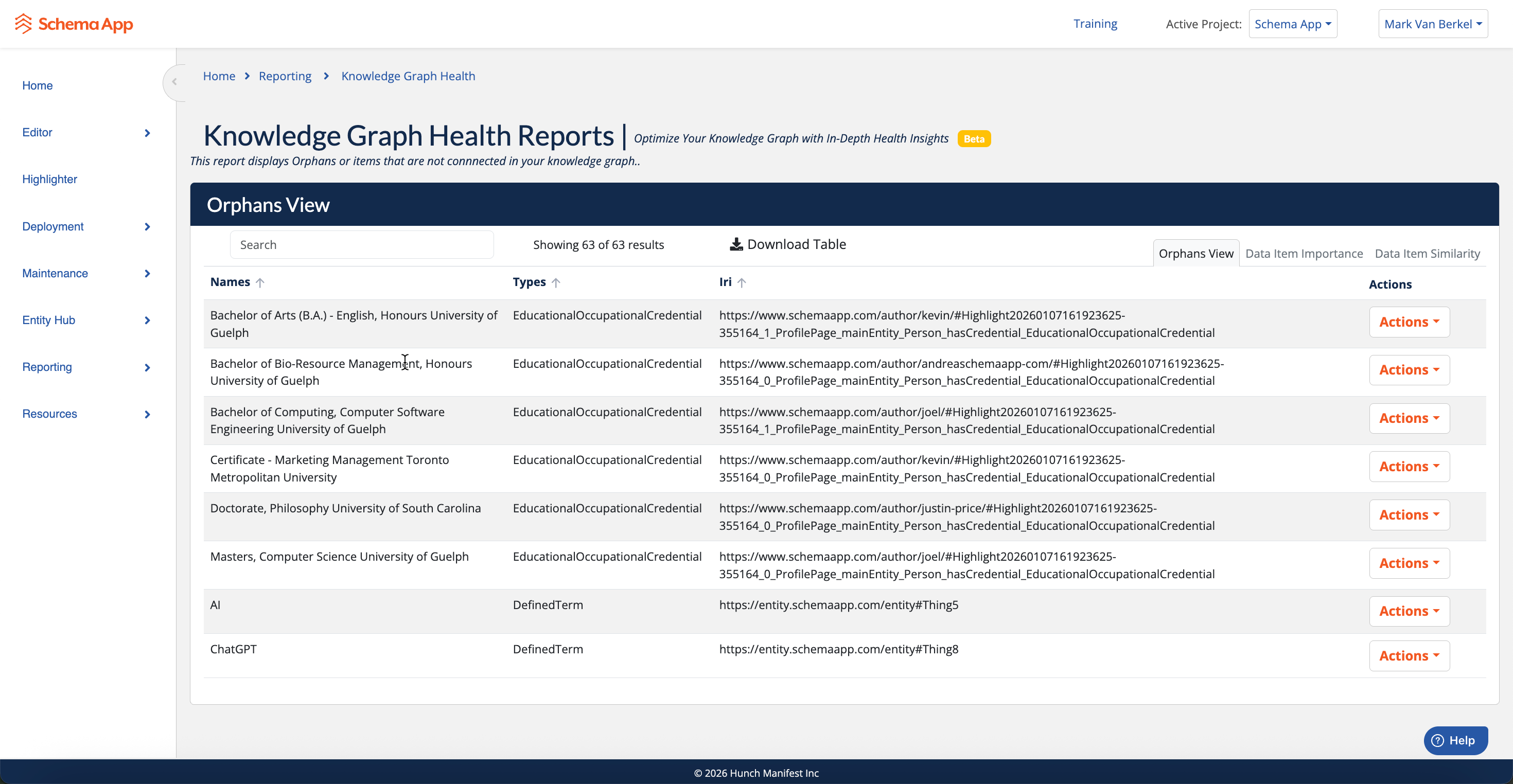
Part of Knowledge Graph Health Reports
Step 1: Orphan Node Analysis – Find disconnected items
Step 2: Data Item Importance – Identify what matters most
Step 3: Data Item Similarity – Improve data quality and clarity
What This Report Shows
The Orphan Node Analysis displays a list of graph items with zero connections.
An orphan node:
Has no incoming or outgoing relationships
Is effectively isolated from the rest of your Knowledge Graph
Cannot influence ranking, similarity, or content insights
The report answers one simple question:
“What entities or data items exist in my graph but are not connected to anything?”
How to Read the Report
Each row represents a single orphaned data item.
Columns Explained
Name
The human-readable name of the entity or data item.Type
The schema.org type (or custom type) of the item
Examples:EducationalOccupationalCredentialDefinedTermPersonOrganization
IRI
The unique identifier for the item in your Knowledge Graph.
This confirms the item exists but is currently unused.Actions
Contextual actions you can take to fix or manage the orphaned item.
Common Reasons Items Become Orphans
Orphan nodes are usually a data modeling or deployment issue, not a system error.
Typical causes include:
1. Missing Relationships
The item was created, but no relationships were added.
Credentials not linked to a Person
DefinedTerms not referenced by content
Entities not connected to a Page or WebPage
2. Incomplete Authoring
An entity was partially authored or imported but never fully connected.
3. Content Removal
Content that previously referenced the entity was deleted or unpublished.
4. Over-Creation of Entities
Entities were created automatically (or manually) without a clear use case.
Why Orphan Nodes Matter
Leaving orphan nodes unresolved can cause real problems:
Weaker Knowledge Graph structure
Inaccurate analytics (importance, similarity, coverage)
Lower confidence in data quality
Missed opportunities to connect content and entities meaningfully
A healthy Knowledge Graph is a connected graph. Orphans are a signal that something needs attention.
What You Should Do Next
For each orphaned item, decide one of three actions:
1. Connect It
If the item is valid and useful:
Add the missing relationship(s)
Link it to the correct Page, Person, Organization, or Concept
Re-deploy so the graph reflects the connection
2. Fix It
If the item exists but is incorrectly modeled:
Update its type
Correct its properties
Attach it to the appropriate parent or context
3. Remove It
If the item serves no purpose:
Delete it
Prevent it from being recreated in the future
Best Practices
Review the Orphan Node Analysis regularly
Treat orphan nodes as data hygiene issues
Resolve orphans before relying on:
Page Importance (PageRank)
Data Item Similarity
Advanced graph analytics
How This Report Fits with Other Health Reports
The Orphan Node Analysis is foundational.
Page Importance (PageRank)
Requires connected nodes to be meaningful.Data Item Similarity
Uses graph connections to calculate similarity—orphans are excluded by design.
Fixing orphans improves every other graph health metric.
Summary
The Orphan Node Analysis helps you:
Identify disconnected items
Improve Knowledge Graph integrity
Ensure your data is usable, reliable, and actionable
If an item isn’t connected, it isn’t contributing. This report tells you exactly where to start fixing that.
Was this article helpful?
That’s Great!
Thank you for your feedback
Sorry! We couldn't be helpful
Thank you for your feedback
Feedback sent
We appreciate your effort and will try to fix the article